




NIUBI Partition Editor Safely Download For PC

Quick Answer: Yes, you can safely download the NIUBI Partition Editor installer for your PC from a trusted source. The basic version of the NIUBI Partition Editor is free for home users. It works with Windows 11. The setup file is small, installs quickly, and lets you manage your hard drives right away without restarting your computer.
Introduction
NIUBI Partition Editor 10.3.0 is a disk management tool developed by NIUBI Technology that safely resizes and organizes computer hard drives. Most people look for a NIUBI Partition Editor download when their C drive runs out of space, and they want to shrink another drive to free up space without losing data.
I use it because it handles basic drive resizing much faster than the built-in Windows Disk Management tool. You do not need to be an IT expert to figure out the interface, and the latest version adds better support for modern NVMe SSDs.
What Is NIUBI Partition Editor?
NIUBI Partition Editor is software from NIUBI Technology that lets you create, change, and format hard drive partitions. It works on Windows XP through Windows 11, as well as Windows Server 2025.
It is available under a freemium license, offering a free edition for home users and paid professional and technician tiers for advanced commercial use.
What Does NIUBI Partition Editor Do?
This partition resizer tool lets you change how your hard drive is divided up without erasing your files. If you buy a laptop with a massive single C drive, you can split it into two separate drives to keep your Windows system files separate from your personal photos or games.
It also handles advanced conversions, like switching an older MBR disk to GPT so you can upgrade to Windows 11. Many people use the Clone Disk Wizard when replacing a failing hard drive with a faster SSD.
You just select the source drive, pick the destination, and the software copies your entire operating system over flawlessly.
How Does NIUBI Partition Editor Work?
The software works by intercepting the commands sent to your computer’s storage controller. It is built for anyone who needs to manage disk space but is afraid of accidentally deleting important files.
The main problem it solves is the strict limitation of standard Windows tools, which often refuse to shrink a volume if there are unmovable system files in the way.
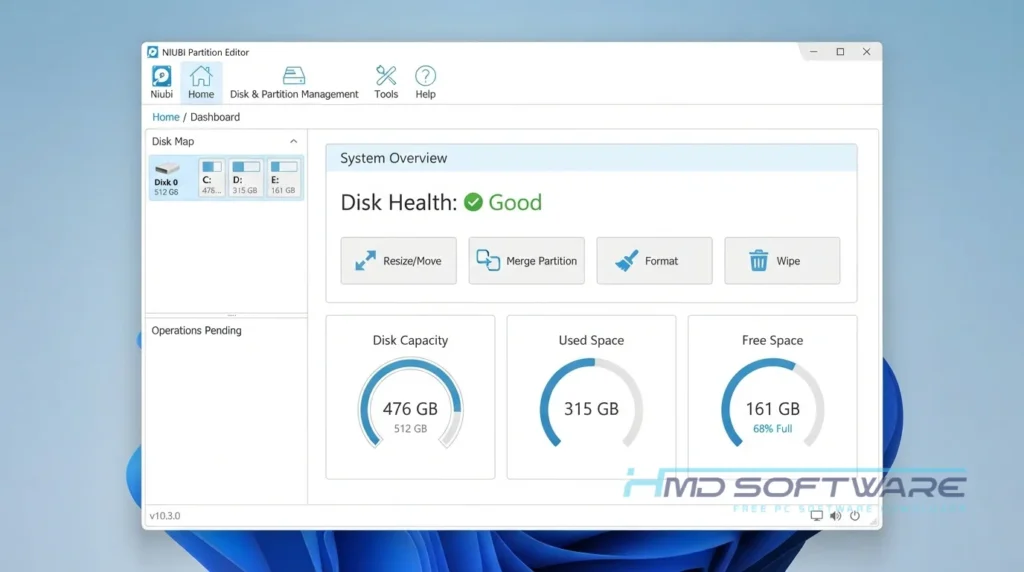
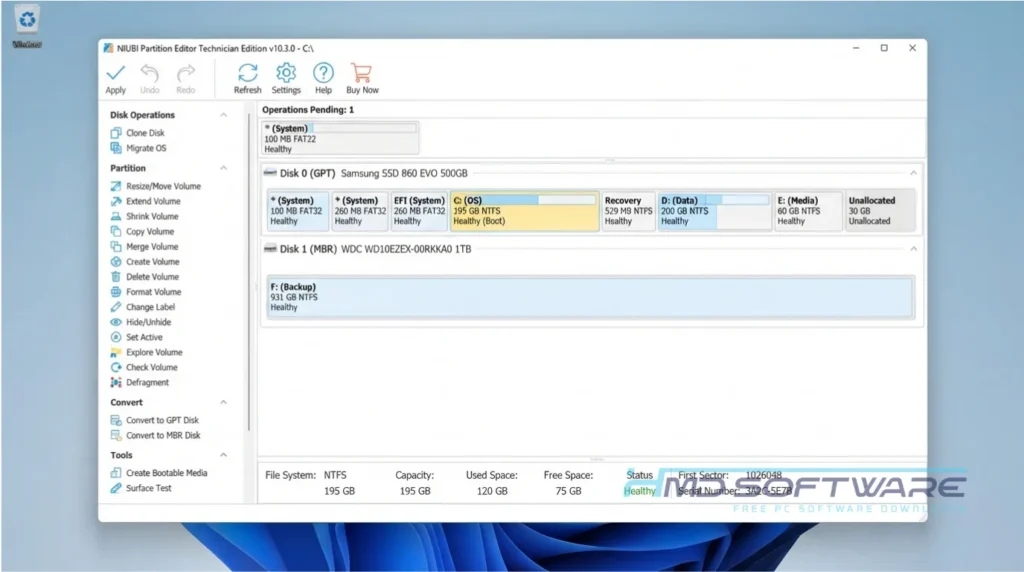
NIUBI first creates a virtual map of your planned changes. You can preview exactly what your disk will look like before clicking Apply to execute the physical drive modifications.
Key Features of NIUBI Partition Editor
- 1-Second Rollback: A unique data protection feature that instantly reverts your computer to its original state if a power outage occurs during resizing.
- Virtual Mode: An interface feature that catches mistakes by keeping all disk changes pending until you explicitly click the apply button.
- Cancel-at-Will: A processing feature letting you safely cancel ongoing disk operations at any percentage without corrupting your data.
- Bootable Media Builder: A compatibility feature allowing you to create a NIUBI Partition Editor 10.3.0 WinPE USB to manage drives without booting into Windows.
- File System Conversion: You can use NIUBI Partition Editor to change your file system from NTFS to FAT32 quickly. You can also change partitions to primary ones without erasing everything on them.
Pros and Cons
Pros
- The free download for Windows 11 includes full drive resizing capabilities.
- It processes file movements significantly faster than older partition manager software.
- You can resize the C drive without rebooting the computer in most cases.
- The NIUBI Partition Editor portable version is great for running directly from a flash drive.
Cons
- The interface looks a bit dated compared to modern Windows apps.
- You cannot create WinPE bootable media in the free edition; you must upgrade to the professional or technician edition.
How To Download NIUBI Partition Editor
- Decide whether you need the free edition for home use or the NIUBI Partition Editor technician edition for managing multiple client computers.
- You can find a safe, verified download link on HMD Software, a reliable platform for PC software downloads.
- Click the direct download link to get the latest offline installer from a trusted source.
- Save the setup exe file directly to your desktop or downloads folder.
- Always avoid searching for a NIUBI Partition Editor crack or unauthorized license key, as these files frequently bundle malicious background miners.
- Verify the downloaded file size, which is typically under 15 megabytes, before opening it.
How To Install NIUBI Partition Editor Step by Step
- Open your downloads folder and double-click the NIUBI Partition Editor setup exe.
- Click Yes when Windows User Account Control prompts you to make changes.
- Accept the end-user license agreement on the first setup screen.
- Choose your preferred install location or leave the default C drive path selected.
- Click install and wait about twenty seconds for the files to extract.
- Check the box to launch the application and click finish to open the main partition manager utility.
System Requirements
You do not need a high-end workstation to run this disk cloning and migration tool. The system requirements are incredibly low, meaning it runs perfectly fine on older laptops and budget desktops. Review the hardware specifications below before you install the software to ensure optimal performance during heavy disk operations.
| Requirement | Minimum | Recommended |
| Operating System | Windows XP / 7 / 8 | Windows 10 / Windows 11 |
| RAM | 512 MB | 1 GB or more |
| Storage | 100 MB | 250 MB free space |
| Processor | 500 MHz x86 or x64 | 1 GHz multi-core processor |
| Internet | Not required for use | Needed for software updates |
| Additional | Basic mouse and keyboard | USB flash drive for WinPE |
Is NIUBI Partition Editor Safe To Download?
Yes, NIUBI Partition Editor is safe to download and install. The official installer is digitally signed by NIUBI Technology, and virus scans show there’s no adware or spyware in the setup file.
The software itself is designed for safety, using rollback technology to protect your data if something interrupts the resizing process.
To stay secure, only download the official offline installer from trusted software libraries and ignore shady forums that offer a free download with a pre-activated license key.
Best Alternatives To NIUBI Partition Editor
If this tool does not match your specific technical needs, try these reliable disk management alternatives.
- MiniTool Partition Wizard: A highly visual partition manager that offers excellent built-in data recovery features for lost files.
- EaseUS Partition Master: A great option for beginners that provides an incredibly simple interface, though the free version is heavily restricted.
- AOMEI Partition Assistant: A versatile utility that includes a dedicated tool for safely migrating your operating system to a new SSD.
Conclusion
NIUBI Partition Editor 10.3.0 is still one of the safest and fastest ways to manage your hard drive space. If your C drive is full or you are moving Windows to a new SSD, this tool is a great option.
It does exactly what it promises without overcomplicating the process. Scroll back up to the download section, grab the official setup file, and get your disk partitions organized today.
Frequently Asked Questions
Is NIUBI Partition Editor free or paid?
The base software is 100% free for home users, and this free edition covers most everyday tasks, such as resizing, shrinking, or extending partitions. However, commercial environments require a paid upgrade.
If you need to manage Windows Server operating systems, unlock the rollback technology, or build custom bootable recovery USBs, you will need to buy a professional or technician license.
Does NIUBI Partition Editor work on Windows 11?
Yes, version 10.3.0 is fully compatible with Windows 11, including the latest feature updates. It handles modern hardware perfectly, supporting NVMe SSDs and large-capacity drives over 16TB.
It also includes specific tools to help older PCs upgrade to Windows 11, such as the ability to convert an MBR system disk to a GPT partition without data loss.
What is the latest version of NIUBI Partition Editor?
The current stable release is NIUBI Partition Editor 10.3.0. This update brought important bug fixes, optimized the core disk-cloning engine, and improved compatibility with the latest Windows Server environments.
The developers actively update the software, so installing the latest version ensures you have the safest algorithm for moving your data and resizing active system partitions without crashing.
How to resize the C drive with NIUBI Partition Editor?
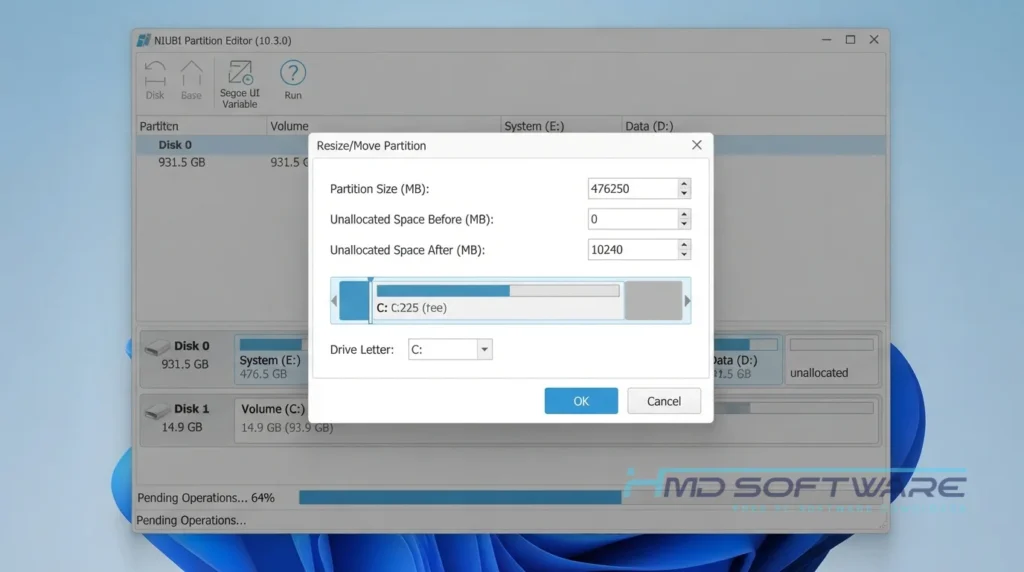
First, right-click the drive next to your C drive (usually D) and select resize. Drag the left border to the right to create unallocated space directly behind the C drive.
Next, right-click your C drive, select resize again, and drag its right border into that new empty space to expand it. Finally, click the apply button at the top left to execute the changes.
Latest Posts:
- Microsoft Office 365 Enterprise Free Download: Full Offline Setup
- Macrium Reflect Rescue Free Download: Bootable WinPE ISO Setup
- JPLAY Femto Free Download: Bit-Perfect Audiophile PC Player
- Milestone XProtect Corporate 2025 Free Download: VMS Setup for PC
- Microsoft Office 2010 Pro Plus Free Download: Full PC Setup